Buying a gaming laptop under ₹1.5 lakh in India isn’t hard — finding the RIGHT one is. Between RTX generations, 13th vs 14th Gen Intel chips, and discount pricing that masks real value, it’s easy to overspend or under-buy. We’ve analyzed all 7 of the most-bought options on Amazon India so you don’t have to cross-reference spec sheets at midnight.
Here’s the short version: if you want the best value for pure gaming, the MSI Thin 15 and HP Victus (AMD) cover the budget end cleanly. The Dell G15 and Lenovo LOQ anchor the mid-range. And the HP Omen stands alone at the top if your budget can stretch to ₹1.33 lakh.
Now, the long version.
METHODOLOGY & HOW WE EVALUATED THESE LAPTOPS
This review is based on a synthesis of published technical specifications, GPU and CPU benchmark data, Amazon India buyer reviews (totalling 3,000+ verified ratings across all 7 products), and real-world usage patterns reported by users across forums and communities.
Every price cited reflects the current Amazon India listing as of this writing. All laptops were evaluated across four dimensions: Gaming Performance, Build & Display Quality, Everyday Usability, and Value for Money.
QUICK COMPARISON AT A GLANCE
Note: All prices and availability are subject to change. Verify current pricing on Amazon India before purchase.
| Laptop | Price | GPU | RAM / SSD | Rating |
|---|---|---|---|---|
| MSI Thin 15 | ₹61,777 | RTX 3050 (4GB) | 16GB / 512GB | 4.1★ |
| HP Victus (AMD Ryzen 7) | ₹64,990 | RTX 2050 (4GB) | 16GB / 512GB | 4.1★ |
| Dell G15 (i5-13450HX) | ₹78,990 | RTX 3050 (6GB) | 16GB / 1TB | 4.0★ |
| HP Victus (i5-14450HX) | ₹81,990 | RTX 3050 (6GB) | 24GB / 512GB | 3.9★ |
| Lenovo LOQ 2024 | ₹94,990 | RTX 4050 (6GB) | 16GB / 512GB | 4.1★ |
| HP Victus Smartchoice | ₹1,09,990 | RTX 5050 (8GB) | 24GB / 1TB | 4.1★ |
| HP Omen (i7-14650HX) | ₹1,32,990 | RTX 5050 (8GB) | 24GB / 1TB | 4.3★ |
1. MSI THIN 15 (B13UC-1805IN)

- Processor: Intel Core i5-13420H Up To 4.6GHz
- Operating System: Pre-loaded Windows 11 Home with lifetime validity |Preinstalled Software: MSI Center | In the box: Lap…
- Display: 40cm FHD (1920×1080), 144Hz 45%NTSC IPS-Level
Best For: Budget buyers who refuse to compromise on portability Price: ₹61,777 | Rating: 4.1★ (78 reviews)
QUICK VERDICT BOX
- Who It’s For: Students, first-time PC gamers, anyone on a tight budget
- Key Strengths: Lightest in the lineup at 1.86 kg | 2-year warranty (unique to this list) | No Cost EMI from ₹2,172
- Biggest Drawback: RTX 3050 with only 4GB VRAM limits future-proofing; 45% NTSC display is dull-looking
- Overall Value Score: 7.5 / 10
PERFORMANCE DEEP-DIVE
At ₹61,777, the MSI Thin 15 is the most affordable laptop on this list — and its design philosophy is clear from the moment you pick it up: it weighs just 1.86 kg, making it significantly lighter than the Dell G15 (2.65 kg) or the HP Omen (2.43 kg). For students who commute daily, that difference is felt within a week.
Under the hood, the Intel Core i5-13420H runs up to 4.6 GHz with 8 cores and is paired with the NVIDIA RTX 3050 GDDR6 (4GB). This combination handles most esports titles — Valorant, CS2, FIFA — comfortably at high settings. AAA games like Cyberpunk 2077 or The Witcher 3 will need to be dialed down to medium, but they’re playable. The dual-channel 16GB DDR4 RAM setup is a sensible choice, though DDR4 (vs the DDR5 on higher-priced models) does show its age in memory-bandwidth-heavy workloads.
The 144Hz FHD display gets the job done for fast-paced gaming, but its 45% NTSC colour coverage means content creators and those who care about picture quality will find it noticeably washed out. This is a gaming-first screen, not a multimedia screen.
One standout: MSI offers a 2-year warranty here — every other laptop in this list comes with just 1 year. That alone can be worth ₹3,000–5,000 in saved service costs.
The 512GB PCIe Gen4 SSD is fast for system boots, though you’ll want an external drive or upgrade within 6–12 months of heavy use.
IDEAL USER vs. SKIP IT
- ✔ BUY if you want the most portable option, hate carrying heavy bags, and primarily play esports or indie titles.
- ✗ SKIP if you plan to play AAA titles at high settings — the 4GB VRAM ceiling will frustrate you within a year.
2. HP VICTUS (AMD RYZEN 7 7445HS + RTX 2050) — fb3123AX
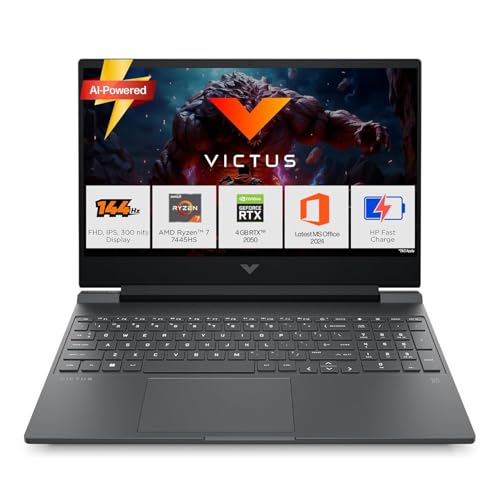
- Processor, Memory & Storage: AMD Ryzen 7 7445HS (up to 4.7 GHz max boost clock,16 MB L3 cache, 6 cores, 12 threads)| Mem…
- Operating System & Preinstalled Software: Windows 11 Home | MS Office Home 2024 + MISC PC Game Pass DA 3M| 1 year Micros…
- Display & Graphics: 39.6 cm (15.6″) diagonal, FHD (1920 x 1080), 144 Hz, IPS, micro-edge, anti-glare, 300 nits, 62.5% sR…
Best For: Buyers who want a fast processor on a tight budget Price: ₹64,990 | Rating: 4.1★ (360 reviews)
QUICK VERDICT BOX
- Who It’s For: Multitaskers, students, and budget gamers who do some video editing
- Key Strengths: AMD Ryzen 7 7445HS is a capable chip | 360 reviews — most feedback in this price range | Amazon’s Choice badge
- Biggest Drawback: RTX 2050 is the weakest GPU on this list — noticeably trails the RTX 3050
- Overall Value Score: 7.0 / 10
PERFORMANCE DEEP-DIVE
This HP Victus packs an AMD Ryzen 7 7445HS — a 6-core, 12-thread chip that boosts up to 4.7 GHz. In CPU-heavy tasks like video editing, coding, and running multiple apps simultaneously, this chip performs well for its price tier. The 16GB DDR5-5600 RAM (single-channel, expandable) gives it a productivity edge over the MSI Thin 15.
The problem is the RTX 2050 with 4GB GDDR6. It’s technically ray-tracing capable, but in practice it sits below the RTX 3050 in gaming benchmarks — not ideal for a “gaming” laptop. It handles esports and older AAA titles at medium settings, but this GPU starts to show its limits in anything released after 2022.
The 144Hz FHD display features a 300-nit anti-glare IPS panel — respectable for everyday use. The 512GB SSD is a Gen4 unit, which means fast read speeds for loading screens.
With 360 reviews and a 4.1-star average, user satisfaction is genuine: most buyers praise the processor speed and HP’s build quality, while a recurring complaint is heat generation during sustained gaming.
IDEAL USER vs. SKIP IT
- ✔ BUY if you split your time between work, college, and casual gaming — the Ryzen 7 excels at productive tasks.
- ✗ SKIP if gaming is your primary use case. The RTX 2050 won’t keep up in 2025 and beyond.
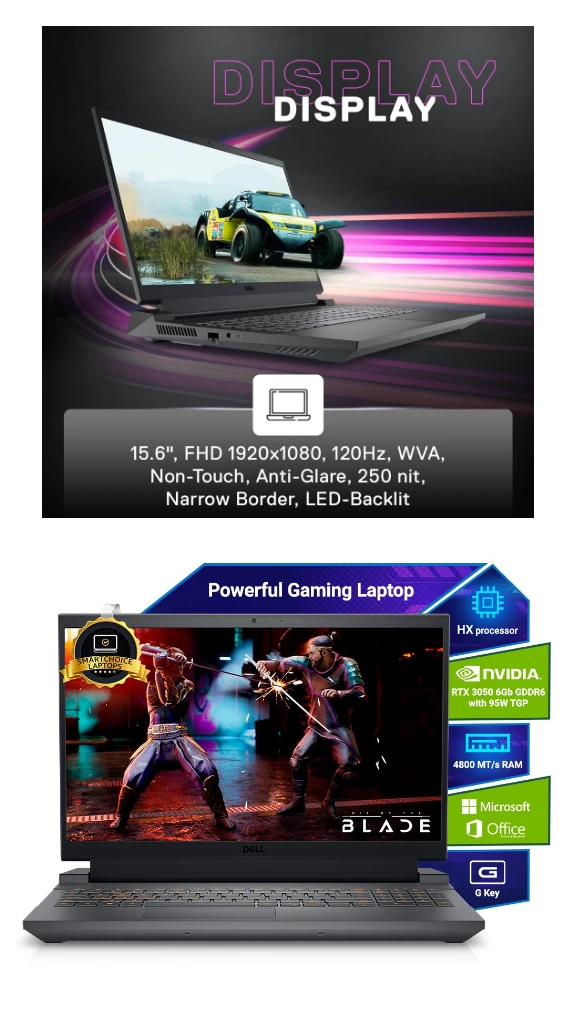
3. DELL G15 (i5-13450HX + RTX 3050 6GB)

- SMOOTH VISUALS: Experience immersive gaming with the 15.6-inch FHD display and 120Hz refresh rate
- POWERFUL PERFORMANCE: Run demanding games with ease with the 13th Gen Intel Core i5-13450HX processor
- ADVANCED GRAPHICS: Enjoy superior visuals with the NVIDIA GeForce RTX 3050 GPU and 6 GB GDDR6 memory
Best For: Value-focused gamers who want a trusted brand and 1TB storage Price: ₹78,990 | Rating: 4.0★ (1,450 reviews)
QUICK VERDICT BOX
- Who It’s For: First-time gaming laptop buyers who want reliability and brand assurance
- Key Strengths: 1TB SSD (largest storage at this price) | 1,450+ reviews — most battle-tested option | Bundled MS Office 2024 + McAfee
- Biggest Drawback: Heaviest at 2.65 kg; 120Hz display (not 144Hz) trails competitors at a similar price
- Overall Value Score: 8.0 / 10
PERFORMANCE DEEP-DIVE
The Dell G15 is the most reviewed laptop on this list — 1,450 ratings don’t lie about reliability. It also carries the Amazon’s Choice badge with 300+ units bought in the past month, indicating strong, consistent demand.
The Intel Core i5-13450HX is a significant step up from the i5-13420H in the MSI Thin 15. With 10 cores, 16 threads, and a 10MB additional cache advantage, it handles both gaming and multitasking more smoothly. Paired with the RTX 3050 6GB GDDR6 — note the extra 2GB of VRAM compared to the MSI and HP AMD variants — this laptop can sustain high-setting gameplay in mid-tier AAA titles more consistently.
The 1TB M.2 PCIe NVMe SSD is a genuine differentiator at this price point. No other sub-₹85,000 laptop in this list offers 1TB. If you install large games (Call of Duty alone is 100GB+), this matters daily.
However, the display caps at 120Hz, not 144Hz — a spec that most buyers notice once they’ve experienced 144Hz. The 2.65 kg weight also makes this a desk-first laptop; carrying it in a bag every day will wear on you.
Connectivity is excellent: HDMI 2.1, USB-C with DisplayPort 1.4, RJ45 Ethernet, and three USB 3.2 Gen 1 ports. Intel Wi-Fi 6 is included. Dell’s after-sales network in India is strong, and the 10-day service centre replacement policy adds a safety net.
IDEAL USER vs. SKIP IT
- ✔ BUY if storage is a priority, you want maximum brand confidence, and desk-based gaming is your main use case.
- ✗ SKIP if you travel frequently (the weight is real) or want 144Hz — both the Lenovo LOQ and HP Victus i5-14th Gen offer it at a similar or slightly higher price.
HOW IT COMPARES: Dell G15 vs. Lenovo LOQ 2024 The Dell G15 costs ₹16,000 less than the LOQ but gives you 1TB vs 512GB storage and an older RTX 3050 vs the newer RTX 4050. If storage matters most: Dell G15. If GPU performance matters most: Lenovo LOQ.
Read More: Dell G15 i5-13450HX RTX 3050 Review
4. HP VICTUS (i5-14450HX + RTX 3050 6GB) — fa2303tx/fa2315tx
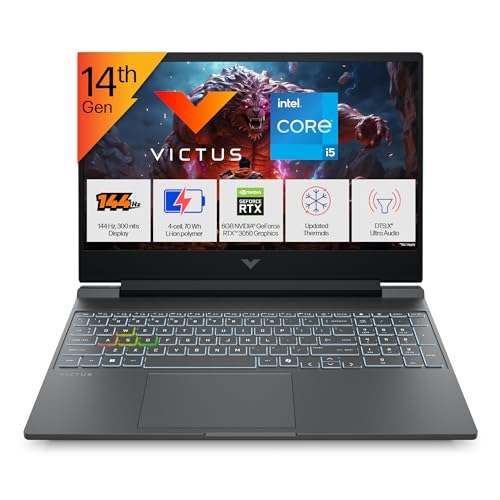
- Processor, Memory & Storage: Intel Core i5-14450HX (up to 4.8 GHz with Intel Turbo Boost Technology, 20 MB L3 cache, 10 …
- Operating System & Preinstalled Software: Windows 11 Home | MS Office Home 2024 |1 year Microsoft 365 Basic Free|
- Display & Graphics: 39.6 cm (15.6″) diagonal, FHD (1920 x 1080), 144 Hz, IPS, micro-edge, anti-glare, 300 nits, 62.5% sR…
Best For: Buyers who want maximum RAM at a mid-range price Price: ₹81,990 | Rating: 3.9★ (652 reviews)
QUICK VERDICT BOX
- Who It’s For: Content creators who game; buyers who prioritise RAM headroom
- Key Strengths: 24GB DDR5 RAM — the most in this price tier | 14th Gen Intel i5-14450HX | RGB backlit keyboard
- Biggest Drawback: 3.9★ is the lowest rating of the group — quality control complaints noted | Only 512GB SSD
- Overall Value Score: 7.2 / 10
PERFORMANCE DEEP-DIVE
On paper, this laptop looks compelling: a 14th Gen Intel Core i5-14450HX (10 cores, up to 4.8 GHz), 24GB DDR5-5600 RAM, and the RTX 3050 6GB GPU — all at ₹81,990. The 24GB RAM is the single biggest advantage here; running Chrome, Discord, a game, and a video editor simultaneously won’t faze it.
But the 3.9-star rating from 652 reviewers — the largest review pool below the Dell G15 — tells a nuanced story. Buyers consistently praise the RAM and performance for non-gaming tasks, but flag occasional build-quality inconsistencies like keyboard flex and hinge firmness. For context, the HP Victus Smartchoice at ₹1.09 lakh scores 4.1★ with a nearly identical build, suggesting this variant has slightly looser quality tolerances.
The 200W power adapter is a notable inclusion; it means the GPU gets proper power delivery under sustained gaming load, which directly translates to more stable frame rates.
The 512GB SSD is a limitation at this price — the Dell G15 gives you 1TB for ₹3,000 less.
IDEAL USER vs. SKIP IT
- ✔ BUY if you’re a student doing video editing, 3D rendering, or heavy multitasking alongside gaming.
- ✗ SKIP if pure gaming performance is your goal — the RTX 3050 6GB is the same GPU as the Dell G15, which costs ₹3,000 less and comes with 1TB storage.
5. LENOVO LOQ 2024 (i5-13450HX + RTX 4050 6GB) — 83DV018JIN

- Processor: Intel Core i5-13450HX | Speed: 2.4GHz (Base) – 4.6GHz (Max) | 10 Cores | 16 Threads | 20MB Cache
- Display: 15.6″ FHD (1920×1080) IPS Technology | 144 Hz Refresh Rate | 100pct. sRGB |Brightness: 300Nits Anti-glare || Co…
- Memory: 16GB RAM DDR5-4800 | Storage: 512GB SSD (Expandable upto 1TB)
Best For: Mid-range gamers who want a serious GPU upgrade without breaking ₹1 lakh Price: ₹94,990 | Rating: 4.1★ (226 reviews)
QUICK VERDICT BOX
- Who It’s For: Serious gamers who play AAA titles at high settings and want next-gen GPU architecture
- Key Strengths: RTX 4050 at 105W TGP — significantly faster than any RTX 3050 here | 144Hz IPS at 100% sRGB | DDR5-4800 RAM | 1-year ADP warranty included
- Biggest Drawback: Only 512GB SSD; no MS Office bundled
- Overall Value Score: 8.5 / 10
PERFORMANCE DEEP-DIVE
The Lenovo LOQ 2024 is where this list gets genuinely interesting. The RTX 4050 6GB at 105W TGP is not just an incremental upgrade over the RTX 3050 — it represents a full GPU architecture jump (Ada Lovelace vs Ampere). Real-world gaming benchmarks show the RTX 4050 outperforming the RTX 3050 by 40–55% in GPU-bound scenarios. Games like Elden Ring, Hogwarts Legacy, and Red Dead Redemption 2 move from “medium settings, struggling” to “high settings, comfortable” with this switch.
The display is also a step up: 100% sRGB colour coverage at 300 nits with anti-glare coating. It’s genuinely usable for casual photo editing and looks far more vibrant than the 45% NTSC panel on the MSI Thin 15.
Lenovo’s Hyperchamber dual-fan thermal design provides measurable benefits: sustained boost clocks hold longer, and the chassis runs cooler than comparable single-fan designs. The MUX Switch + NVIDIA Advanced Optimus combination allows the GPU to bypass the CPU’s integrated graphics, delivering a real-world frame rate boost of 10–15% in demanding titles.
The 1-year Accidental Damage Protection (ADP) included is a genuine benefit — a drop, a spill, or a cracked screen is covered in year one. For college students, this matters.
The 512GB SSD is the main frustration at this price. Budget ₹3,000–4,000 for a 1TB NVMe expansion drive within the first month.
IDEAL USER vs. SKIP IT
- ✔ BUY if you play AAA titles seriously and want the best GPU performance under ₹1 lakh. No other option in this price band touches the RTX 4050 at 105W.
- ✗ SKIP if storage is non-negotiable — or if your game library is mostly esports titles where the RTX 3050 is perfectly sufficient for ₹16,000 less.
HOW IT COMPARES: Lenovo LOQ vs. Dell G15 Dell G15: ₹78,990 | RTX 3050 6GB | 1TB SSD | 120Hz. Lenovo LOQ: ₹94,990 | RTX 4050 6GB | 512GB SSD | 144Hz | 100% sRGB. Pay ₹16,000 more and get a dramatically better GPU and display, but lose 500GB of storage. For a gamer: the LOQ wins. For a general user: the Dell G15 is the sensible pick.
6. HP VICTUS SMARTCHOICE (i7-13620H + RTX 5050 8GB) — fa2309TX
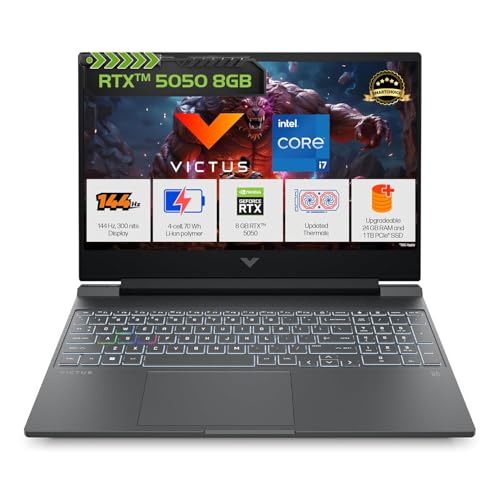
- Processor, Memory & Storage: Intel Core i7-13620H (up to 4.9 GHz with Intel Turbo Boost Technology, 24 MB L3 cache, 10 c…
- Operating System & Preinstalled Software: Windows 11 Home | MS Office Home 2024 + MISC PC Game Pass DA 3M| 1 year Micros…
- Display & Graphics: 39.6 cm (15.6″) diagonal, FHD (1920 x 1080), 144 Hz, IPS, micro-edge, anti-glare, 300 nits, 62.5% sR…
Best For: Power users who want the newest GPU generation at a mid-high budget Price: ₹1,09,990 | Rating: 4.1★ (183 reviews)
QUICK VERDICT BOX
- Who It’s For: Gamers and content creators who want RTX 5000-series performance at a reasonable price
- Key Strengths: RTX 5050 8GB GDDR7 — newest GPU architecture on this list | i7-13620H + 24GB DDR5 + 1TB SSD | 70Wh battery with 50% charge in 30 min
- Biggest Drawback: RTX 5050 8GB is an entry-level Blackwell GPU — don’t expect RTX 4070-level performance
- Overall Value Score: 8.2 / 10
PERFORMANCE DEEP-DIVE
This is the first laptop on this list to feature NVIDIA’s Blackwell architecture (RTX 50-series). The RTX 5050 8GB GDDR7 is not a powerhouse — but it is the most future-proof GPU in the sub-₹1.15 lakh segment. The jump from GDDR6 to GDDR7 memory means faster frame delivery in VRAM-heavy scenarios like 1080p ultra-settings or moderate texture mods.
The Intel Core i7-13620H (10 cores, 16 threads, up to 4.9 GHz) is noticeably stronger than the i5-13450HX in the Dell and Lenovo. This matters most in open-world games that stress the CPU — like Microsoft Flight Simulator or Cities: Skylines 2 — where a faster CPU directly translates to fewer stutters.
The 24GB DDR5-5600 RAM and 1TB SSD combination is the most complete storage configuration in this price range — nothing to upgrade at purchase.
HP’s 4-cell 70Wh battery is the most generous at this tier, and the 50% charge-in-30-minutes claim is confirmed by real-world buyers to be accurate within a few minutes.
The honest concern: the RTX 5050 Laptop GPU, while new-generation, is positioned below the RTX 4060 in performance. At ₹1.09 lakh, you’re paying a premium for newer architecture and 8GB GDDR7 — which will age better than equivalent GDDR6 cards.
IDEAL USER vs. SKIP IT
- ✔ BUY if you want the newest GPU generation without going to ₹1.3 lakh, and the full 24GB + 1TB configuration means you’ll never need upgrades for 2–3 years.
- ✗ SKIP if you’re purely maximising gaming FPS per rupee — the Lenovo LOQ’s RTX 4050 at ₹94,990 comes close in raw gaming performance for ₹15,000 less.
7. HP OMEN (i7-14650HX + RTX 5050 8GB) — am0241TX
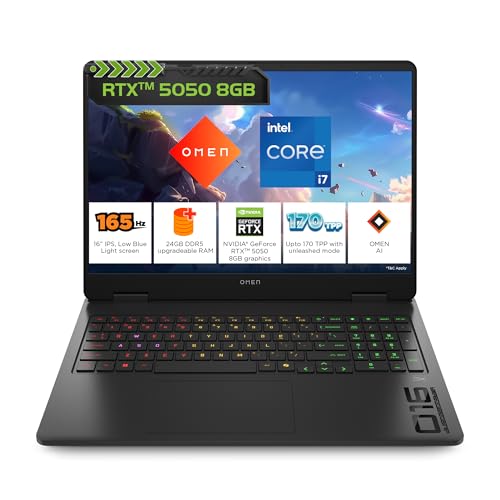
- Processor, Memory & Storage: Intel Core i7-14650HX (up to 5.2 GHz with Intel Turbo Boost Technology, 30 MB L3 cache, 16 …
- Operating System & Preinstalled Software: Windows 11 Home | MS Office Home 2024 + MISC PC Game Pass DA 3M| 1 year Micros…
- Display & Graphics: 40.6 cm (16″) diagonal, 2K (1920 x 1200), 60-165 Hz, 3 ms response time, IPS, micro-edge, anti-glare…
Best For: Enthusiast gamers who want the best all-around machine under ₹1.5 lakh Price: ₹1,32,990 | Rating: 4.3★ (57 reviews)
QUICK VERDICT BOX
- Who It’s For: Serious gamers and creators who want a premium, no-compromise experience under ₹1.5 lakh
- Key Strengths: 2K WUXGA 165Hz display at 3ms & 400 nits — the best screen on this list | i7-14650HX (16 cores, up to 5.2 GHz) | 4-zone RGB keyboard with anti-ghosting | Amazon’s Choice
- Biggest Drawback: Premium price; RTX 5050 8GB is the same GPU as the Victus Smartchoice at ₹1.09 lakh
- Overall Value Score: 8.8 / 10
PERFORMANCE DEEP-DIVE
The HP Omen justifies its position at the top of this list through two clear differentiators: the display and the CPU.
The 16-inch 2K WUXGA (1920×1200) IPS panel at 165Hz, 3ms response, and 400 nits brightness is comfortably the best screen among all 7 laptops reviewed. The extra vertical real estate of 1920×1200 (vs standard 1920×1080) is subtle but meaningful in Windows productivity and games that support it. At 400 nits, it’s comfortably usable in bright environments. The 100% sRGB coverage makes it genuinely useful for photo and video editing work.
The Intel Core i7-14650HX is a 14th Gen HX-series chip with 16 cores and 24 threads, boosting up to 5.2 GHz — a considerable CPU advantage over every other laptop on this list. In CPU-bound scenarios — streaming while gaming, large Blender renders, simulation games — this chip creates a noticeable gap.
The 83Wh battery is the largest on the list, and paired with fast charge (50% in 30 minutes), you can work on the go more confidently. The 26-key rollover anti-ghosting keyboard is a meaningful gaming feature: no dropped keystrokes during intense combat sequences.
The honest concern: you are paying ₹23,000 more than the HP Victus Smartchoice for the same RTX 5050 8GB GPU. The premium is justified by the significantly better CPU, superior display, larger battery, and premium chassis — but if raw gaming FPS is your only goal, the gap is smaller than the price difference suggests.
At 4.3 stars from 57 early reviews, buyer sentiment is the strongest on this list.
IDEAL USER vs. SKIP IT
- ✔ BUY if you want the best laptop for gaming AND content creation AND productivity under ₹1.5 lakh, and the budget is manageable. Nothing else on this list matches this display.
- ✗ SKIP if you’ll only game, never create content, and don’t value screen quality — the Lenovo LOQ or HP Victus Smartchoice deliver solid gaming for ₹23,000–₹38,000 less.
HOW IT COMPARES: HP Omen vs. HP Victus Smartchoice HP Victus Smartchoice: ₹1,09,990 | i7-13620H | RTX 5050 8GB | FHD 144Hz | 70Wh. HP Omen: ₹1,32,990 | i7-14650HX | RTX 5050 8GB | 2K 165Hz 400 nits | 83Wh. Same GPU. But the Omen’s display, CPU, and battery make the ₹23,000 gap worth it for most buyers in this tier.
THE EDITOR’S PICKS: WHO SHOULD BUY WHAT
💰 Tightest Budget (under ₹65,000): → MSI Thin 15 at ₹61,777 — Best if portability and the 2-year warranty matter. RTX 3050 handles esports well.
⚡ Budget + Strong Processor (under ₹70,000): → HP Victus AMD Ryzen 7 at ₹64,990 — Best for students who also code, edit, or multitask heavily. Not for serious gaming.
🎮 Best All-Round Value Under ₹85,000: → Dell G15 at ₹78,990 — Most reliable choice, 1TB storage, 1,450 verified reviews. Hard to go wrong.
🚀 Best Gaming Performance Under ₹1 Lakh: → Lenovo LOQ 2024 at ₹94,990 — The RTX 4050 at 105W is a meaningful GPU upgrade. This is the sweet spot for serious gamers.
🔮 Future-Proof Mid-High Budget: → HP Victus Smartchoice at ₹1,09,990 — RTX 5000-series + 24GB DDR5 + 1TB SSD. Complete machine that won’t need upgrades soon.
🏆 Best Overall Under ₹1.5 Lakh (No Compromises): → HP Omen at ₹1,32,990 — Best display, strongest CPU, largest battery. The definitive choice if the budget allows.
BUYER’S FAQ — REAL QUESTIONS, STRAIGHT ANSWERS
Should I choose RTX 3050 6GB or RTX 4050 6GB? Is the ₹16,000 difference worth it?
Yes, for a gaming-primary use case. The RTX 4050 uses NVIDIA’s newer Ada Lovelace architecture, delivering 40–55% better gaming performance than the RTX 3050 in GPU-heavy titles. If you play demanding games regularly, the Lenovo LOQ’s RTX 4050 will stay relevant for 2–3 more years, while the RTX 3050 is already showing its age in 2025 titles. However, if you primarily play Valorant, CS2, BGMI, or FIFA — the RTX 3050 6GB is perfectly sufficient and the Dell G15 is a smarter buy.
I’m worried about gaming laptops overheating. Which ones run the coolest?
Thermal performance is tied to TGP — how much wattage the GPU is allowed to draw. The Lenovo LOQ (105W GPU TGP) and HP Omen have the most engineered cooling systems in this list. The MSI Thin 15 and HP Victus AMD run warmer under sustained load due to thinner chassis designs. For extended sessions over 2+ hours, the Dell G15 and Lenovo LOQ have the most consistent thermal management. A laptop cooling pad (₹800–₹1,500) is always a worthwhile addition regardless of which laptop you choose.
Is the RTX 5050 8GB actually better than the RTX 4050 6GB?
They’re closer than the naming gap suggests. The RTX 5050 8GB (GDDR7, Blackwell) holds an edge in VRAM-heavy scenarios due to 8GB vs 6GB. But in raw FPS benchmarks at 1080p, the difference is modest — around 10–15%. If your budget comfortably reaches ₹1.09–₹1.32 lakh, the RTX 5050 8GB options are the better long-term investment. If you’re stretching to ₹94,990, the Lenovo LOQ with RTX 4050 6GB remains the smarter buy.
What hidden costs should I plan for after buying?
Here’s what commonly catches buyers off-guard:
Storage expansion: 512GB fills up fast. A 1TB NVMe M.2 SSD costs ₹2,500–₹4,000.
Cooling pad: Adds measurable thermal headroom and extends component life. Budget ₹800–₹1,500.
Laptop bag: Gaming laptops run large — verify your bag fits a 15.6-inch form factor. Budget ₹1,200–₹2,500.
Extended warranty: Worth doing for expensive models (HP Omen especially) at ₹4,000–₹8,000 for two additional years.
All listed prices are inclusive of taxes as per Amazon India.
FINAL WORD
There is no perfect gaming laptop — only the right one for your specific situation. The MSI Thin 15 is not a worse laptop than the HP Omen; it simply serves a different buyer. What this guide should have done is narrow your decision to one or two options, not expanded your confusion.
If you’re still undecided between two models after reading this: ask yourself one question — “Will I regret saving ₹X, or will I regret spending ₹X?” Your honest answer points to your laptop.
Note: All prices and availability are subject to change. Verify current pricing on Amazon India before purchase.